What Is ERP Software?
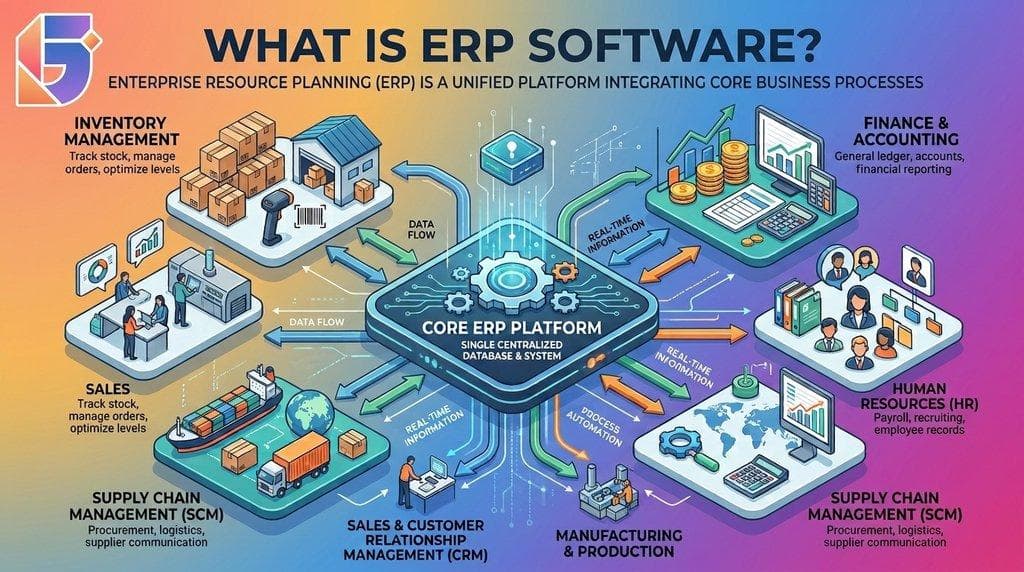
If you are wondering what is ERP software, the simplest answer is that ERP software is a business management system designed to connect and manage an organization's core operations in one integrated platform.
ERP stands for Enterprise Resource Planning. Instead of keeping financial records, inventory information, employee data, purchasing records, sales information, and operational reports in separate systems or spreadsheets, an ERP system brings these business processes together.
Modern ERP software can connect departments, centralize business data, automate workflows, and provide management with a more consistent view of business operations. Major ERP providers such as SAP, Oracle, and Microsoft describe ERP as software that integrates core business processes including finance, procurement, supply chain, human resources, manufacturing, and other operational functions.
For businesses in Nepal, an ERP solution can be particularly useful when operations become too complex to manage efficiently through disconnected accounting software, spreadsheets, paper records, and separate departmental applications.
This guide explains what ERP software is, how an ERP system works, its major modules, benefits, types, implementation process, and how businesses can evaluate an ERP solution.
What Does ERP Stand For?
ERP stands for Enterprise Resource Planning.
The term describes a category of software used to manage and coordinate the resources and processes required to operate a business.
Despite the word "enterprise," ERP software is not limited to large corporations. Modern ERP platforms can be designed for small businesses, medium-sized companies, growing enterprises, manufacturers, retailers, hospitals, educational institutions, service organizations, and other industries.
An ERP system typically connects several functions within a business so that information can move between departments instead of remaining isolated.
For example:
Sales → Inventory → Purchase → Accounting → Reporting
When a sales order is created, the ERP system can potentially update inventory information, generate billing information, record financial transactions, and make the transaction available for reporting.
The exact workflow depends on the ERP platform and how the organization configures it.
How Does ERP Software Work?
At its core, an ERP system works by connecting people, processes, data, and business functions through a centralized software environment.
Traditional businesses may have different systems for different departments:
| Business Function | Traditional Approach | ERP Approach |
|---|---|---|
| Accounting | Separate accounting software | Connected financial module |
| Inventory | Spreadsheet or standalone system | Integrated inventory management |
| HR | Separate employee records | Integrated HR module |
| Sales | CRM/spreadsheets | Connected sales management |
| Purchasing | Email and spreadsheets | Purchase workflow |
| Reporting | Manual data collection | Centralized reporting |
| Management | Multiple data source | Unified business information |
The major difference is integration.
Instead of asking different departments to manually exchange information, an ERP system can allow authorized users and modules to work with connected business data.
Microsoft describes an ERP system as including software, data, workflows, integrations, users, permissions, and reporting tools that help manage core operations from a connected environment.
A Simple Example of ERP in Business
Imagine a company in Nepal selling electronic products.
A customer purchases a laptop.
Without an ERP system, the process might look like this:
- The sales employee records the order.
- The inventory employee checks stock separately.
- The accountant receives the sales information.
- The warehouse prepares the product.
- The finance team records the transaction.
- Management later collects information for reporting.
This can create duplicated work and opportunities for data-entry errors.
With an integrated ERP system, the sales transaction can be connected to inventory, billing, accounting, and reporting workflows.
A simplified process could look like:
Customer Order → Sales → Inventory Update → Invoice → Accounting → Management Report
The ERP does not eliminate the need for employees. Instead, it helps employees work from connected processes and shared business information.
What Are the Main ERP Modules?
One of the most important things to understand about what is ERP software is that ERP is usually not a single-purpose application.
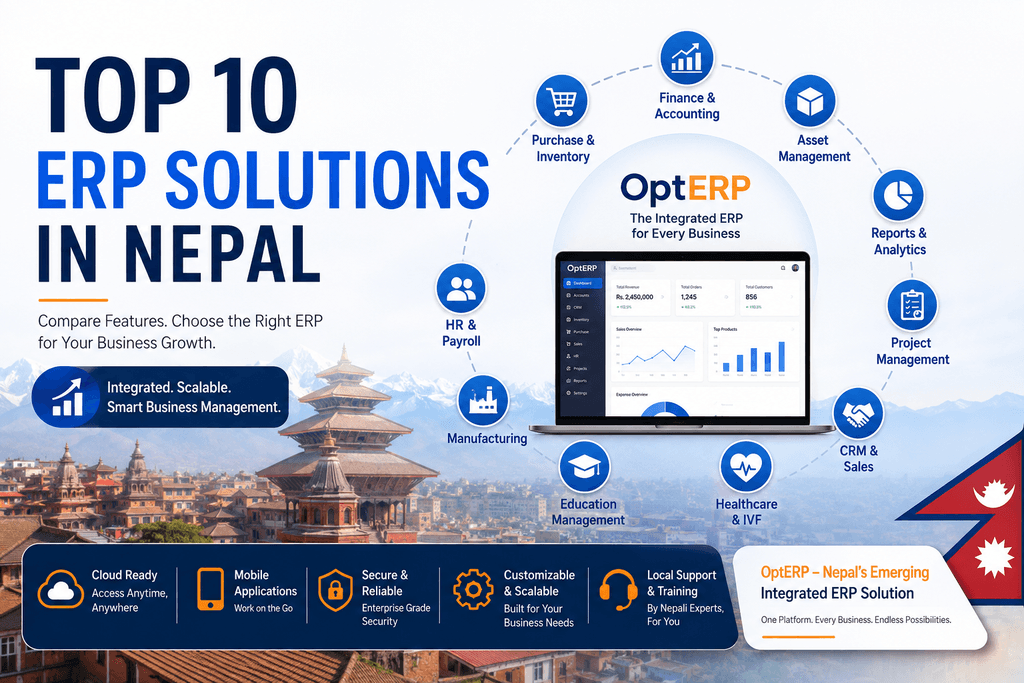
An ERP platform can contain multiple modules designed for different business functions.
The modules available depend on the ERP provider, industry, and business requirements.
1. Finance and Accounting
The finance module is one of the core components of many ERP systems.
It can help organizations manage:
- General ledger
- Accounts payable
- Accounts receivable
- Invoicing
- Expenses
- Budgets
- Financial reporting
- Cash-flow information
- Tax-related records
- Financial transactions
Instead of maintaining financial information separately from operational data, an integrated ERP can connect financial activities with sales, purchasing, inventory, and other processes.
2. Human Resource Management
An ERP system can also include Human Resource Management (HRM) capabilities.
Depending on the platform, these can include:
- Employee records
- Attendance
- Leave management
- Payroll
- Recruitment
- Performance management
- Employee documentation
- Department management
Connecting HR data with other business functions can give management a more centralized view of workforce information.
3. Inventory Management
Inventory management becomes increasingly complicated as a business grows.
An ERP inventory module can help businesses monitor:
- Stock levels
- Product movements
- Warehouses
- Stock transfers
- Purchases
- Sales
- Reorder levels
- Product information
- Inventory valuation
For businesses dealing with multiple products, warehouses, suppliers, or locations, centralized inventory information can reduce the need to maintain several disconnected spreadsheets.
4. Procurement and Purchasing
ERP software can help organizations manage the purchasing lifecycle.
A typical process may include:
Purchase Request → Approval → Purchase Order → Supplier → Goods Receipt → Invoice → Payment
This creates a structured purchasing workflow rather than relying entirely on emails, paper documents, or spreadsheets.
Procurement is commonly included among the core business processes managed through ERP platforms.
5. Sales Management
ERP sales functionality can help organizations manage the sales process.
Depending on the system, businesses may manage:
- Quotations
- Sales orders
- Customers
- Pricing
- Invoices
- Sales representatives
- Product availability
- Sales reports
Because sales can connect with inventory and finance, employees can work with information that is more closely connected to the actual business transaction.
6. Manufacturing Management
Manufacturing businesses often have more complex ERP requirements.
A manufacturing ERP system may support:
- Bill of materials
- Production planning
- Work orders
- Raw materials
- Production schedules
- Quality management
- Work-in-progress tracking
- Finished goods
- Production costing
Manufacturing ERP can therefore connect production activities with inventory, purchasing, finance, and supply chain processes.
7. Supply Chain Management
Supply chain management involves multiple interconnected activities.
ERP software can help organizations coordinate areas such as:
- Suppliers
- Procurement
- Inventory
- Warehousing
- Logistics
- Orders
- Distribution
- Demand planning
When supply chain information is connected, managers can gain greater visibility into the movement of products and resources.
8. Reporting and Analytics
Business data becomes significantly more useful when organizations can turn it into reports and insights.
ERP reporting can provide information about:
- Revenue
- Expenses
- Inventory
- Sales
- Purchasing
- Employee activity
- Production
- Cash flow
- Business performance
Modern ERP platforms increasingly incorporate analytics and AI capabilities. Microsoft and SAP, for example, describe modern ERP environments that incorporate AI, automation, analytics, and connected business data.
Why Do Businesses Need ERP Software?
A business may initially operate successfully using spreadsheets, accounting software, email, paper records, and separate applications.
The problem often appears as the business grows.
More customers create more transactions. More employees create more internal processes. More products create more inventory records. More branches create more operational complexity.
Eventually, employees may spend significant time collecting, checking, transferring, and reconciling information instead of using that information to make decisions.
ERP software addresses this problem by bringing important business processes into a more integrated environment.
Common reasons businesses consider ERP include:
- Disconnected business systems
- Duplicate data entry
- Limited management visibility
- Manual reporting
- Inventory management difficulties
- Growing transaction volumes
- Complex procurement processes
- Multiple branches or locations
- Increasing employee numbers
- Need for standardized workflows
- Demand for real-time or near-real-time information
ERP does not automatically solve every operational problem. The value of an ERP system depends on appropriate software selection, implementation, data quality, user adoption, and business processes.
Key Benefits of ERP Software
The benefits of ERP depend on the organization and implementation, but several advantages are commonly associated with integrated ERP systems.
1. Centralized Business Data
Instead of maintaining important information across disconnected applications, an ERP system can provide a central environment for business data.
This can make it easier for authorized users to access relevant information.
2. Better Process Integration
ERP connects business functions that naturally depend on each other.
For example:
Sales + Inventory + Finance
A sales transaction can have implications for stock and accounting.
Connecting these functions reduces the need to repeatedly transfer information between departments.
3. Improved Operational Efficiency
ERP software can automate or standardize repetitive processes.
Examples include:
- Invoice generation
- Approval workflows
- Purchase orders
- Notifications
- Payroll calculations
- Inventory updates
- Financial reporting
Automation can reduce manual administrative work while creating more consistent workflows.
4. Improved Reporting
When business information is centralized, management can create reports from connected operational data.
This can help answer questions such as:
- Which products are selling?
- How much inventory is available?
- What are the current expenses?
- Which customers owe money?
- How much has the business purchased?
- Which departments are performing according to targets?
5. Better Visibility Across Departments
A major purpose of ERP is to connect departments rather than treating them as isolated units.
For example, management can potentially view information from finance, sales, inventory, HR, and procurement through the same ERP environment.
SAP describes ERP as providing organizations with a unified view of core business activities and a centralized source of information.
6. Scalability
A business may begin with a few employees and limited transactions but grow significantly over time.
A scalable ERP platform can allow organizations to add:
- Users
- Departments
- Branches
- Products
- Warehouses
- Business processes
- Reports
- Integrations
The exact scalability depends on the ERP architecture and provider.
ERP Software vs Traditional Business Software
It is important to understand that ERP software is not simply another accounting application.
Accounting software primarily focuses on financial activities.
An ERP system can connect finance with other business processes.
| Area | Accounting Software | ERP Software |
|---|---|---|
| Accounting | ✓ | ✓ |
| Finance | ✓ | ✓ |
| Inventory | Limited/varies | ✓ |
| HR | Usually limited | Often available |
| Procurement | Limited/varies | ✓ |
| Manufacturing | Usually limited | Available in many ERP platforms |
| Sales | Basic/varies | ✓ |
| Cross-department integration | Limited | Core capability |
| Centralized reporting | ✓ | ✓ |
| Workflow automation | Varies | Common capability |
This does not mean accounting software is unsuitable for every business. A small organization with straightforward financial requirements may not need a comprehensive ERP system.
The important question is whether the organization's operational complexity requires integrated business management.
What Is Cloud ERP?
Cloud ERP is ERP software delivered through cloud infrastructure rather than being hosted entirely on an organization's own local servers.
Cloud ERP can allow authorized users to access business applications through the internet, depending on the provider's architecture and security controls.
SAP defines cloud ERP as ERP software delivered over the internet and describes it as a model that can provide access from different locations and support scalability.
Cloud ERP can provide:
- Remote accessibility
- Centralized updates
- Scalable infrastructure
- Reduced dependence on local servers
- Easier access across branches
- Integration with cloud services
However, organizations should evaluate security, data ownership, availability, internet dependency, compliance, backup policies, and vendor support before selecting a cloud ERP solution.
What Is On-Premise ERP?
An on-premise ERP system is deployed on infrastructure controlled by the organization or its chosen hosting environment.
Businesses may choose on-premise deployment when they require greater control over infrastructure, data management, customization, or internal IT policies.
However, on-premise ERP may require additional responsibility for:
- Servers
- Maintenance
- Backups
- Security
- Infrastructure upgrades
- IT support
Some businesses may also consider hybrid ERP, combining cloud and locally managed components.
ERP Software in Nepal: What Should Businesses Consider?
When evaluating ERP software in Nepal, businesses should look beyond the number of features listed on a product page.
The ERP should fit the organization's actual operating environment.
Important considerations include:
| ERP Evaluation Area | What To Check |
|---|---|
| Accounting | Financial workflows and reporting |
| Tax & Compliance | Relevant Nepalese requirements |
| Localization | Local business practices and terminology |
| Language | English/Nepali requirements where relevant |
| Calender | Support for required calendar workflows |
| Deployment | Cloud, on-premise, or hybrid |
| Connectivity | Internet and offline requirements |
| Customization | Ability to adapt workflows |
| Integration | APIs and third-party systems |
| Support | Local implementation and technical support |
| Scalability | Ability to support future growth |
| Security | Roles, permissions, backups and access controls |
| Reporting | Management and statutory reporting needs |
For Nepalese organizations, localization should be treated as an important evaluation factor rather than simply choosing an ERP based on international popularity.
Businesses should also verify current regulatory and tax requirements with the relevant Nepalese authorities and qualified professionals before configuring an ERP for compliance-related processes.
How to Choose an ERP System?
Choosing an ERP system should begin with the business rather than the software.
Before comparing ERP providers, document the organization's current processes.
Step 1: Identify Business Problems
Ask:
- What processes are currently manual?
- Where does duplicate data entry occur?
- Which reports take too long to prepare?
- Where do departments struggle to share information?
- What inventory problems exist?
- What information does management lack?
Step 2: Identify Required Modules
Not every business needs every ERP module.
A trading company may prioritize:
Accounting + Inventory + Sales + Procurement
A manufacturer may require:
Accounting + Inventory + Procurement + Manufacturing + Quality + Supply Chain
A service company may prioritize:
Accounting + HR + CRM + Project Management + Billing
Step 3: Evaluate Integration
Ask whether the modules actually communicate with each other.
An ERP system should not simply be a collection of unrelated applications under one brand.
Step 4: Check Customization
Some businesses have industry-specific processes.
Check whether the system can accommodate required workflows without excessive customization.
Step 5: Evaluate Total Cost
ERP costs can include:
- Software licensing
- Implementation
- Customization
- Data migration
- Training
- Support
- Infrastructure
- Integrations
- Upgrades
Therefore, businesses should evaluate total cost of ownership, not only the initial software price.
ERP Implementation Process
ERP implementation is a business transformation project, not simply a software installation.
A typical implementation can involve:
Business Analysis → ERP Selection → Planning → Configuration → Data Migration → Testing → Training → Deployment → Support
1. Business Analysis
The implementation team identifies current processes, requirements, problems, and desired outcomes.
2. ERP Selection
Businesses compare ERP platforms based on functionality, industry fit, scalability, deployment, cost, support, and integration.
3. Configuration
The ERP is configured according to the organization's workflows.
4. Data Migration
Existing customer, supplier, product, employee, financial, and other relevant information may need to be transferred into the new system.
5. Testing
The organization tests workflows and identifies problems before deployment.
6. Employee Training
Users need to understand how the new processes work.
7. Go-Live
The ERP becomes part of daily business operations.
8. Continuous Improvement
After implementation, organizations can review workflows, reports, integrations, and user requirements and make improvements.
ERP implementation timelines vary depending on factors such as business complexity, data readiness, integrations, customization, and rollout strategy.
Common Challenges of ERP Implementation
ERP can provide significant operational value, but implementation can also introduce challenges.
Common challenges include:
- Poorly defined requirements
- Incomplete data
- Resistance to process changes
- Insufficient employee training
- Excessive customization
- Weak implementation planning
- Poor integration with existing systems
- Unrealistic timelines
- Inadequate post-launch support
One of the most important lessons is that ERP implementation should not simply automate inefficient processes without examining them first.
Organizations should identify unnecessary steps and redesign workflows where appropriate.
ERP and Business Growth
As businesses grow, the amount of information they generate increases.
Consider a company expanding from one location to five branches.
It may now have:
- Multiple inventories
- More employees
- More customers
- More suppliers
- Multiple bank transactions
- More sales channels
- More purchase orders
- More financial records
- More management reports
Managing all of this through disconnected spreadsheets becomes increasingly difficult.
An integrated ERP solution can provide a structured platform for managing these processes and scaling operations.
This is one reason ERP is often associated with business growth and digital transformation.
What Is the Future of ERP Software?
ERP is evolving beyond traditional record-keeping and transaction management.
Modern ERP platforms increasingly incorporate:
- Artificial Intelligence
AI can assist with data analysis, recommendations, forecasting, document processing, and workflow automation.
- Business Analytics
Organizations can analyze operational data to identify patterns and support planning.
- Cloud Computing
Cloud ERP allows organizations to access business systems without maintaining all infrastructure locally.
- Automation
Repetitive tasks can increasingly be automated through workflows and intelligent systems.
- Mobile Access
Employees and managers can access selected business information through mobile devices, depending on the ERP platform.
- API-Based Integration
Modern ERP systems increasingly need to connect with websites, payment platforms, CRM systems, e-commerce applications, government systems, logistics platforms, and other business applications.
Microsoft and SAP both describe modern ERP platforms that increasingly combine integrated business processes with cloud capabilities, automation, AI, analytics, and connected data.
Is ERP Software Suitable for Every Business?
No.
ERP software should be selected based on actual business requirements.
A very small business with a simple operation may be able to manage effectively with accounting software and a few specialized tools.
An organization with multiple departments, branches, warehouses, employees, suppliers, and complex workflows may benefit more from an integrated ERP system.
The goal should not be to purchase the most complicated ERP.
The goal should be to select an ERP solution that matches the organization's current needs while providing reasonable room for future growth.
Frequently Asked Questions (FAQ's):
Q. What is ERP software in simple words?
ERP software is a business management system that connects important business functions such as accounting, inventory, sales, purchasing, HR, manufacturing, and reporting in one integrated platform.
Q. What does ERP stand for?
ERP stands for Enterprise Resource Planning.
Q. What is an ERP system used for?
An ERP system is used to manage and connect core business processes, including finance, accounting, inventory, procurement, sales, HR, manufacturing, supply chain, and reporting.
Q. Is ERP software only for large companies?
No. ERP software can be used by businesses of different sizes. The appropriate system depends on the organization's processes, complexity, budget, industry, and growth requirements.
Q. What are the main ERP modules?
Common ERP modules include finance and accounting, inventory, procurement, sales, HR, manufacturing, supply chain, CRM, project management, and reporting.
Q. What is the difference between ERP and accounting software?
Accounting software primarily manages financial activities, while ERP software can integrate finance with other operational functions such as inventory, procurement, sales, HR, and manufacturing.
Q. What is cloud ERP?
Cloud ERP is ERP software delivered through cloud infrastructure and accessed over the internet. It can provide remote access and scalable infrastructure depending on the provider.
Q. What is ERP software in Nepal used for?
Businesses in Nepal can use ERP software to manage areas such as accounting, inventory, sales, purchasing, HR, manufacturing, supply chain, reporting, and other business processes.
Q. How much does ERP software cost?
ERP costs vary significantly depending on the number of users, modules, deployment model, customization, implementation requirements, integrations, training, and support.
Q. How long does ERP implementation take?
There is no single implementation timeline. The duration depends on business size, complexity, data migration, integrations, customization, testing, training, and rollout strategy.
Q. Can ERP software be customized?
Many ERP systems support configuration and customization. However, businesses should avoid unnecessary customization because it can increase implementation complexity and long-term maintenance requirements.
Q. Does ERP software support AI?
Many modern ERP platforms now incorporate AI-related capabilities for areas such as analytics, automation, forecasting, document processing, and workflow assistance. The specific capabilities vary by ERP provider and product.
Q. How do I choose the right ERP system?
Start by documenting business requirements, identifying required modules, evaluating integration and customization capabilities, checking deployment options, comparing total costs, and assessing implementation and support services.
Q. Does a business need ERP software to grow?
Not necessarily. ERP is one tool for managing growing operational complexity. Whether a business needs ERP depends on its size, processes, transaction volume, departments, reporting requirements, and future plans.
Final Thoughts: What Is ERP Software?
So, what is ERP software?
ERP software is an integrated business management platform that connects an organization's core processes, data, workflows, and departments.
Rather than managing accounting, inventory, sales, purchasing, HR, manufacturing, and reporting through disconnected systems, an ERP system can bring these functions into a connected environment.
The real value of ERP is not simply having more software. It is the ability to create connected business processes, centralized information, standardized workflows, automation, and better visibility.
For businesses evaluating ERP software in Nepal, the most important step is to start with business requirements. Identify the operational problems you want to solve, determine which ERP modules you actually need, evaluate local requirements, compare deployment options, and assess the provider's implementation and support capabilities.
If your business is outgrowing spreadsheets or disconnected software, exploring an ERP solution for business can be an important step toward more integrated and data-driven operations.
Need an ERP Solution for Your Business?
Geofinity Pvt. Ltd. helps businesses in Nepal streamline operations with integrated ERP and business management solutions.
📍 Baluwatar 4, Kathmandu, Nepal
📧 [email protected]
📞 +977 9802372660
Contact Geofinity today to discuss your ERP requirements.