ERP Workflow Automation: Processes Businesses Can Automate
Modern businesses handle hundreds of repetitive tasks every day—from approving purchase orders and processing invoices to managing inventory, employee leave, sales orders, and financial reports. When these processes depend heavily on manual work, businesses face delays, duplicate data entry, errors, and limited visibility.
ERP workflow automation helps businesses replace repetitive manual steps with structured, rule-based workflows inside their ERP system. Instead of employees repeatedly checking spreadsheets, sending approval emails, or moving information between disconnected systems, an ERP can automatically trigger the next step based on predefined rules.
For example, when inventory falls below a predefined level, an ERP can generate a purchase request. When an employee submits a leave request, the system can automatically route it to the appropriate manager. When an invoice reaches the system, it can be matched against purchase records and sent through the required approval process.
This makes ERP workflow automation an important part of modern business process automation and digital transformation.
In this guide, we'll explore the key business processes that can be automated through ERP, the benefits of automation, common workflow examples, implementation considerations, and how businesses can determine where automation will deliver the greatest value.
What Is ERP Workflow Automation?
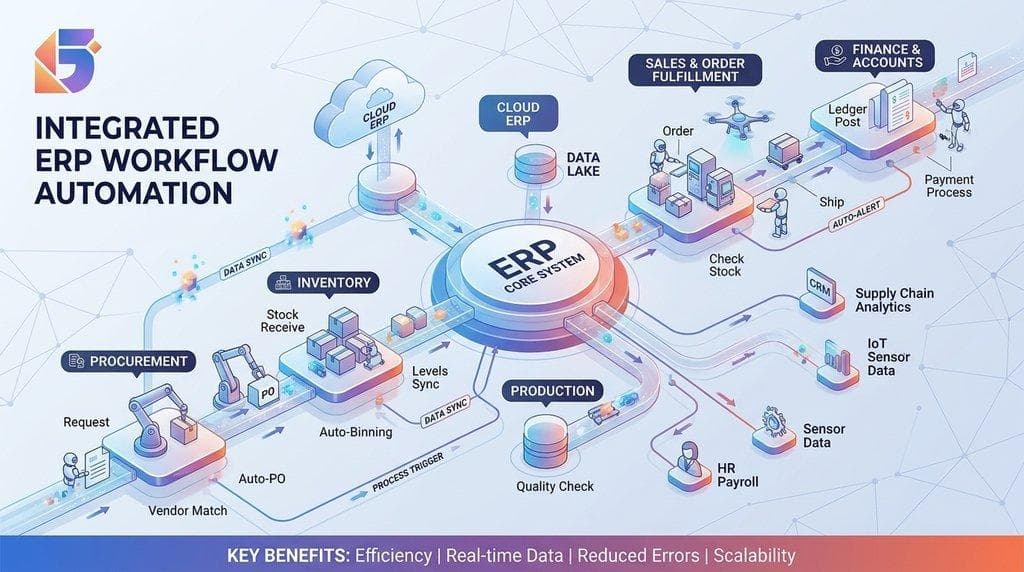
ERP workflow automation is the use of an ERP system to automatically manage, route, approve, update, and track business processes according to predefined rules.
A workflow generally follows a sequence such as:
Trigger → Rule → Action → Approval → Next Step → Completion
For example:
Inventory reaches reorder level → ERP detects stock shortage → Purchase request is generated → Manager receives approval request → Purchase order is created → Supplier receives order.
Without automation, several employees may need to monitor inventory, prepare documents, send emails, obtain approval, and update records manually.
With an automated ERP workflow, much of this process can happen automatically.
How ERP Workflow Automation Works
| Workflow Stage | Example |
|---|---|
| Trigger | Inventory falls below minimum level |
| Condition | Stock quantity is below reorder point |
| Automated Action | Purchase request is generated |
| Approval | Request is sent to purchasing manager |
| Next Action | Purchase order is created |
| Notification | Relevant employees receive alerts |
| Completion | Inventory and accounting records are updated |
The exact workflow depends on the ERP system, business rules, industry, and level of customization.
Why Should Businesses Automate ERP Workflows?
ERP automation is not simply about reducing the number of clicks employees make. The bigger objective is to create faster, more consistent, and more transparent business processes.
1. Reduce Manual Data Entry
Employees often enter the same information into multiple systems or documents.
Automation can transfer information between connected ERP modules automatically.
For example, a completed sales order can update:
- Inventory
- Customer records
- Accounts receivable
- Sales reports
- Delivery information
This reduces repetitive data entry.
2. Reduce Human Errors
Manual processes create opportunities for:
- Incorrect quantities
- Duplicate records
- Missed approvals
- Incorrect calculations
- Forgotten follow-ups
- Data-entry mistakes
Automated workflows use predefined rules to perform repetitive tasks consistently.
3. Speed Up Approvals
Waiting for approvals can become a major operational bottleneck.
An automated ERP can notify the correct approver immediately and escalate requests when necessary.
4. Improve Visibility
Managers can track:
- Pending approvals
- Purchase requests
- Sales orders
- Inventory levels
- Outstanding invoices
- Employee requests
- Workflow delays
Instead of asking employees for updates, decision-makers can access information directly from the ERP.
5. Improve Scalability
Manual processes that work for a small company may become difficult when transaction volumes increase.
ERP workflow automation allows businesses to handle growing transaction volumes without increasing administrative work at the same rate.
10 Business Processes That Can Be Automated With ERP
Almost every department can benefit from workflow automation when the process is repetitive, rule-based, and predictable.
Here are some of the most valuable ERP processes businesses can automate.
1. Purchase Request and Purchase Order Approval
Procurement is one of the strongest candidates for ERP automation.
A typical manual purchasing process may involve:
- Employee identifies a requirement.
- Employee creates a purchase request.
- Manager reviews the request.
- Procurement team contacts suppliers.
- Purchase order is prepared.
- Manager approves the purchase order.
- Supplier receives the order.
An ERP can automate many of these steps.
Automated purchasing workflow:
Purchase Request → Approval → Supplier Selection → Purchase Order → Approval → Supplier Notification
Businesses can create rules based on:
- Purchase amount
- Department
- Product category
- Supplier
- Budget
- Approval authority
For example, purchases below a specific threshold may require one approval, while higher-value purchases may automatically move to senior management.
Business benefit: Faster procurement, better control over spending, and improved approval visibility.
2. Invoice Processing and Approval
Accounts payable departments frequently spend significant time handling invoices.
ERP workflow automation can help businesses automate:
- Invoice entry
- Purchase order matching
- Approval routing
- Payment status tracking
- Exception notifications
- Accounting updates
A common workflow is:
Invoice Received → PO Matching → Verification → Approval → Payment Processing → Accounting Update
If an invoice matches the purchase order and receiving record, the system can move it through the workflow automatically.
If there is a mismatch, the ERP can flag the invoice for manual review.
Example:
A company purchases 100 units of a product.
The ERP compares:
Purchase Order: 100 units
Goods Received: 100 units
Invoice: 100 units
If the records match, the invoice can proceed to approval.
If the invoice contains 120 units, the system can automatically flag the discrepancy.
3. Inventory Reordering
Inventory management is another area where automation can provide substantial value.
Instead of employees constantly checking stock levels, an ERP can monitor inventory automatically.
When stock reaches a predefined reorder point, the system can:
- Generate a purchase request
- Notify the purchasing department
- Recommend an order quantity
- Identify preferred suppliers
- Update procurement workflows
Example:
Suppose a business sets a minimum stock level of 50 units.
When inventory reaches 50 units:
ERP detects low stock → Purchase request generated → Procurement notified → Approval requested
This helps reduce the risk of stockouts.
It can also prevent businesses from relying solely on manual spreadsheet monitoring.
4. Sales Order Processing
Sales order management often requires coordination between sales, inventory, finance, and delivery teams.
An ERP can automate the process after an order is confirmed.
Automated sales workflow:
Customer Order → Order Validation → Credit Check → Inventory Check → Approval → Delivery → Invoice
For example, after a salesperson enters an order, the ERP can automatically check whether the required products are available.
If inventory is sufficient, the order can move to fulfillment.
If inventory is insufficient, the system can trigger a procurement or backorder workflow.
This creates stronger coordination between sales and operations.
5. Employee Leave and Attendance Requests
HR departments can also benefit from ERP workflow automation.
Instead of employees submitting paper forms or sending individual emails, employees can submit requests through the ERP.
Automated leave workflow:
Employee Request → Leave Balance Check → Manager Approval → HR Update → Employee Notification
The ERP can automatically check:
- Available leave balance
- Requested dates
- Approval authority
- Department rules
- Conflicting requests
Once approved, the employee's leave balance can be updated automatically.
This reduces administrative work for HR teams while giving employees greater visibility into request status.
6. Employee Onboarding
Employee onboarding involves multiple departments and tasks.
A new employee may require:
- Employee record creation
- Document collection
- ID creation
- System access
- Equipment allocation
- Payroll setup
- Department assignment
- Training schedules
ERP workflow automation can coordinate these tasks.
Example:
New Employee Added → HR Verification → IT Notification → Equipment Assignment → Payroll Setup → Department Notification
The workflow can assign tasks to different departments automatically.
This prevents important onboarding tasks from being forgotten.
7. Expense Claim Approval
Employee expense management can become difficult when employees submit receipts through emails, spreadsheets, or paper forms.
An ERP can automate:
Expense Submission → Receipt Verification → Policy Check → Manager Approval → Finance Approval → Reimbursement
Businesses can configure rules for:
- Expense limits
- Departments
- Expense categories
- Required receipts
- Approval levels
For example, an expense exceeding a predefined amount can automatically be routed to a senior manager.
8. Customer Credit Approval
Businesses that sell products or services on credit need to evaluate customer risk before approving transactions.
ERP automation can help create a structured credit workflow.
Example:
New Customer → Credit Application → Credit Check → Approval → Credit Limit Assigned
The ERP can consider information such as:
- Existing outstanding balance
- Payment history
- Credit limit
- Previous transactions
- Internal approval rules
If a customer exceeds their credit limit, the ERP can automatically flag the order for review.
This can help finance teams maintain better control over receivables.
9. Financial Reporting
Financial reporting is another area where ERP automation can reduce repetitive work.
Instead of manually collecting information from different spreadsheets, an integrated ERP can consolidate data from:
- Sales
- Purchasing
- Inventory
- Payroll
- Expenses
- Accounts payable
- Accounts receivable
The system can then generate reports based on predefined schedules.
Automated reporting examples:
- Daily sales reports
- Weekly inventory reports
- Monthly financial reports
- Outstanding receivables
- Expense summaries
- Department performance reports
- Cash-flow reports
Managers can also receive automated alerts when specific financial thresholds are reached.
10. Customer Notifications and Follow-Ups
ERP workflows don't have to be limited to internal operations.
Businesses can automate customer communication based on specific events.
For example:
Order Confirmed → Confirmation Notification
Order Shipped → Shipping Notification
Invoice Generated → Invoice Notification
Payment Overdue → Reminder
Service Completed → Feedback Request
These workflows can improve customer communication while reducing repetitive administrative work.
ERP Workflow Automation by Department
Different departments can automate different processes.
| Department | Processes That Can Be Automated |
|---|---|
| Finance | Invoice approval, payments, expense claims, reporting |
| Procurement | Purchase requests, approvals, purchase orders |
| Inventory | Reorder alerts, stock transfers, inventory updates |
| Sales | Order processing, approvals, customer notifications |
| HR | Leave, attendance, onboarding, employee requests |
| Operations | Task assignments, production workflows, scheduling |
| Management | Alerts, dashboards, approvals, reports |
| Customer Service | Tickets, notifications, follow-ups |
| Manufacturing | Production planning, material requests, quality checks |
This demonstrates why ERP is more than accounting software.
A properly configured ERP can connect workflows across the entire organization.
Manual Processes vs ERP Workflow Automation
The difference becomes clearer when comparing the traditional approach with an automated workflow.
| Area | Manual Process | ERP Workflow Automation |
|---|---|---|
| Approvals | Email/paper-based | Automated routing |
| Data Entry | Repeated manually | Data reused across modules |
| Notifications | Employee-dependent | Automatic |
| Reporting | Spreadsheet preparation | Real-time system reports |
| Inventory | Manual checking | Automated alerts |
| Invoice Matching | Manual verification | System-assisted matching |
| Tracking | Difficult | Centralized |
| Errors | More opportunities | Reduced repetitive errors |
| Scalability | Requires more administrative effort | Easier to scale |
The goal isn't necessarily to eliminate human involvement.
Instead, ERP automation should remove unnecessary manual work while keeping people involved where judgment and decision-making are required.
How to Identify Processes Ready for Automation?
Not every process should be automated immediately.
The best candidates usually have several characteristics.
Look for processes that are:
- Repetitive
- Rule-based
- High-volume
- Time-consuming
- Prone to manual errors
- Dependent on multiple approvals
- Dependent on notifications
- Spread across multiple departments
- Frequently delayed
- Easy to measure
For example, manually checking whether inventory has fallen below a reorder point is a strong automation candidate.
On the other hand, strategic decisions requiring human judgment may not be suitable for complete automation.
A Simple ERP Automation Priority Framework
Businesses can prioritize automation using four factors:
Frequency × Time × Risk × Business Impact
For example:
| Process | Frequency | Manual Effort | Automation Priority |
|---|---|---|---|
| Invoice approval | High | High | Very High |
| Inventory monitoring | High | Medium | High |
| Leave requests | Medium | Low | Medium |
| Annual strategy planning | Low | High | Low |
| Purchase approvals | High | High | Very High |
This approach helps businesses avoid automating processes simply because automation is possible.
Instead, they can focus on processes where automation creates measurable business value.
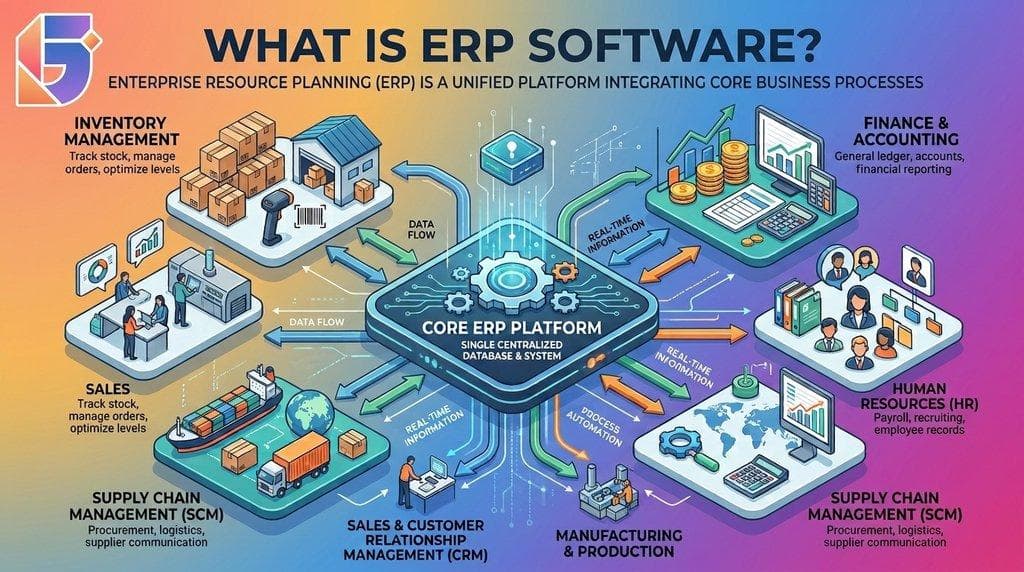
ERP Workflow Automation and Business Integration
One of the biggest advantages of ERP automation is that workflows can connect multiple departments.
Consider a simple customer order.
A customer places an order.
The ERP can automatically:
➜ Validate the order.
➜ Check inventory.
➜ Reserve stock.
➜ Update the sales record.
➜ Create delivery instructions.
➜ Generate the invoice.
➜ Update accounts receivable.
➜ Update management dashboards.
Without an integrated ERP, these steps may occur across separate spreadsheets, applications, emails, and documents.
ERP integration turns individual departmental processes into a connected business workflow.
Common ERP Workflow Automation Challenges:
Automation can deliver major benefits, but poor implementation can create new problems.
1. Automating a Bad Process
If the existing process is inefficient, automating it may simply make the inefficient process happen faster.
Businesses should first identify unnecessary steps.
Improve the process before automating it.
2. Over-Automation
Not every decision should be automatic.
Complex exceptions may require human review.
A good ERP workflow should define when automation stops and human intervention begins.
3. Poor Data Quality
Automation depends on accurate information.
Incorrect customer records, inventory quantities, supplier data, or financial information can cause automated workflows to produce incorrect results.
4. Lack of Employee Training
Employees need to understand:
- How workflows operate
- Which actions they are responsible for
- How approvals work
- What happens when an exception occurs
- How to monitor workflow status
5. Excessive Customization
Highly customized workflows can increase implementation complexity and maintenance requirements.
Businesses should first determine whether standard ERP functionality can solve the problem.
How to Implement ERP Workflow Automation Successfully?
A structured implementation approach can reduce risks.
Step 1: Map Existing Processes
Document how each process currently works.
Identify:
- Who performs each task
- How information moves
- Where approvals occur
- Where delays happen
- Where errors occur
Step 2: Identify Automation Opportunities
Prioritize repetitive, high-volume, rule-based activities.
Step 3: Define Business Rules
Specify exactly what should trigger the workflow.
For example:
If purchase amount exceeds the department's approval threshold, send the request to the designated senior approver.
Step 4: Configure the ERP
Set up:
- Triggers
- Conditions
- Approvals
- Notifications
- User roles
- Escalation rules
- Reports
Step 5: Test the Workflow
Test normal scenarios and exceptions.
For example:
- What happens when an approver rejects a request?
- What happens if inventory is unavailable?
- What happens if an invoice doesn't match the purchase order?
- What happens if an employee doesn't respond?
Step 6: Train Employees
Employees should understand both automated and manual parts of the workflow.
Step 7: Measure Performance
Track metrics before and after implementation.
Useful KPIs include:
- Processing time
- Approval time
- Error rate
- Processing cost
- Number of manual steps
- Workflow completion rate
- Exception rate
Measuring the ROI of ERP Workflow Automation
Businesses should measure automation using tangible outcomes.
A basic automation ROI framework can be:
ROI = (Automation Benefits − Automation Costs) ÷ Automation Costs × 100
Potential benefits include:
- Reduced administrative hours
- Fewer errors
- Faster order processing
- Faster approvals
- Lower operational costs
- Improved inventory management
- Better customer response times
For example, if an organization spends hundreds of employee hours every month manually processing invoices, even a partial reduction in processing time can produce significant operational savings.
ERP Workflow Automation in Nepalese Businesses
For businesses in Nepal, ERP automation can be particularly useful where organizations are moving from spreadsheets and disconnected applications toward integrated business management systems.
Nepalese businesses may need workflows covering:
- Accounting
- VAT and tax-related processes
- Inventory
- Procurement
- Sales
- Human resources
- Payroll
- Manufacturing
- Healthcare
- Branch operations
- Reporting
Businesses operating across multiple branches can also use centralized ERP workflows to standardize processes while maintaining branch-level visibility.
Local business requirements, tax practices, organizational structures, and approval hierarchies should be considered when designing ERP workflows for Nepal.
Visual Workflow: Example of Automated Procurement
A simple automated procurement workflow can look like this:
Employee Identifies Requirement
↓
Purchase Request
↓
ERP Checks Rules
↓
┌────────┴────────┐
↓ ↓
Within Limit Above Limit
↓ ↓
Manager Approval Senior Approval
↓ ↓
Purchase Order
↓
Supplier Notification
↓
Goods Received
↓
Invoice Matching
↓
Payment
↓
Accounting Updated
This type of workflow connects procurement, inventory, finance, and management into one process.
Key Benefits of ERP Workflow Automation
When implemented correctly, ERP automation can provide several business advantages.
- Faster Operations
Automated workflows reduce unnecessary waiting between process stages.
- Better Accuracy
Rules and automated data transfers reduce repetitive manual entry.
- Greater Accountability
Every workflow action can be associated with a user, date, approval, or status.
- Improved Visibility
Managers can see where transactions are in the process.
- Lower Administrative Work
Employees can spend less time on repetitive tasks and more time on higher-value activities.
- Better Scalability
Businesses can process increasing volumes without relying entirely on additional administrative staff.
- Stronger Decision-Making
Integrated ERP data gives management better visibility into business performance.
ERP Workflow Automation Checklist
Before automating a process, businesses should ask:
- Is the process repetitive?
- Does it happen frequently?
- Does it involve multiple people?
- Does it require approval?
- Does it cause regular delays?
- Is manual data entry involved?
- Are errors common?
- Can clear rules define the process?
- Can the ERP access all required information?
- What happens when an exception occurs?
- Who is responsible for monitoring the workflow?
- How will success be measured?
If most answers are yes, the process may be a strong candidate for ERP workflow automation.
Frequently Asked Questions (FAQ's):
Q. What is ERP workflow automation?
ERP workflow automation uses an ERP system to automatically route, approve, update, notify, and track business processes according to predefined rules.
Q. Which business processes can ERP automate?
Common examples include purchasing, invoice approval, inventory reordering, sales orders, employee leave, expense claims, onboarding, financial reporting, and customer notifications.
Q. Can ERP automate approval processes?
Yes. ERP systems can automatically route requests to the appropriate person based on rules such as department, transaction type, amount, or organizational hierarchy.
Q. Can small businesses benefit from ERP workflow automation?
Yes. Small businesses can automate repetitive processes such as purchasing, invoicing, inventory management, accounting, HR requests, and approvals.
Q. Does ERP automation eliminate employees?
Not necessarily. The primary objective is to reduce repetitive administrative work, while employees continue handling decisions, exceptions, strategy, and customer-facing activities.
Q. How does ERP automation reduce errors?
Automated workflows reduce repetitive data entry and apply predefined rules consistently, reducing opportunities for common manual mistakes.
Q. Can ERP automate inventory management?
Yes. ERP systems can monitor inventory levels, trigger reorder alerts, generate purchase requests, and support stock transfer workflows.
Q. Can ERP automate invoice processing?
Many ERP systems can support automated invoice workflows, including matching invoices with purchase orders, routing approvals, identifying exceptions, and updating accounting records.
Q. Is ERP workflow automation suitable for Nepalese businesses?
Yes. Businesses in Nepal can use ERP automation for accounting, inventory, procurement, HR, sales, manufacturing, healthcare, branch management, and other operational processes. Workflows should be configured around the organization's local requirements.
Q. How much does ERP workflow automation cost?
The cost depends on the ERP platform, number of users, modules, integrations, customization, implementation requirements, and workflow complexity. Businesses should evaluate total implementation and maintenance costs rather than looking only at software licensing.
Q. Should businesses automate every ERP process?
No. Businesses should prioritize repetitive, rule-based, high-volume processes where automation can create measurable value.
Q. How long does ERP automation implementation take?
Implementation time varies significantly. A simple workflow may be configured quickly, while organization-wide automation involving multiple departments, integrations, data migration, and customization can take considerably longer.
Q. What is the biggest mistake businesses make with ERP automation?
One common mistake is automating inefficient processes without first simplifying and standardizing them. Process improvement should come before automation.
The Future of ERP Workflow Automation
ERP systems are increasingly moving beyond basic record-keeping toward intelligent business process management.
Automation can increasingly work alongside technologies such as:
- Artificial intelligence
- Machine learning
- Predictive analytics
- Business intelligence
- Robotic process automation
- Cloud computing
- API integrations
- Real-time dashboards
This means future ERP workflows may not only respond to predefined rules but also help businesses identify patterns, predict potential issues, and recommend actions.
For example, an intelligent ERP could potentially identify unusual purchasing behavior, predict inventory requirements, highlight payment risks, or recommend operational actions based on historical data.
However, the foundation remains the same: clean data, clearly defined processes, appropriate business rules, and effective ERP implementation.
Conclusion: Start With the Processes That Matter Most
ERP workflow automation can transform repetitive business processes into faster, more consistent, and more transparent workflows.
From purchase approvals and invoice processing to inventory management, HR requests, sales orders, expense claims, and financial reporting, businesses can automate many activities that traditionally consume valuable employee time.
The most successful approach is not to automate everything at once. Start with high-volume, repetitive processes that create measurable delays or errors, then expand automation as the organization becomes more comfortable with the ERP system.
A well-designed ERP workflow should make work easier for employees, improve visibility for managers, and create a more connected operation across departments.
For businesses evaluating ERP software, the key question is no longer simply “Can this ERP store our business data?”
It is:
“Can this ERP help our business execute its processes automatically and efficiently?”
If the answer is yes, ERP workflow automation can become a powerful foundation for operational efficiency and long-term digital transformation.
Ready to Automate Your Business Processes?
If your business still relies heavily on spreadsheets, emails, paper approvals, or disconnected systems, it may be time to explore an integrated ERP approach. Evaluate your most repetitive workflows first, identify the biggest bottlenecks, and choose an ERP solution that can automate processes as your business grows.
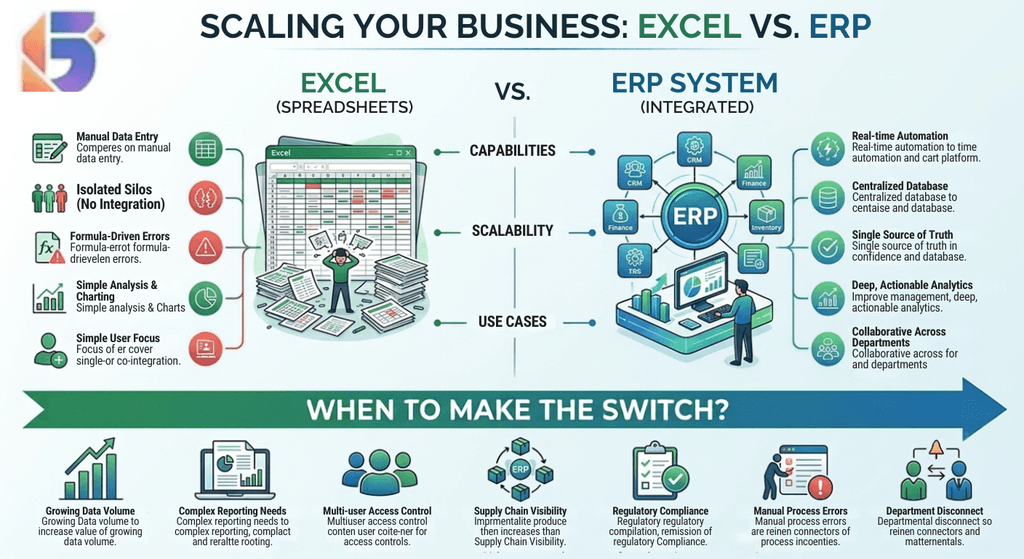
Internal linking opportunities: Link this article to related pages such as ERP Software in Nepal, ERP Implementation Services, ERP vs Excel, ERP for Manufacturing, ERP for Healthcare, and Cloud ERP Solutions to strengthen topical authority and guide readers toward relevant conversion pages.
Looking for a Technology Partner?
Geofinity Pvt. Ltd. helps businesses in Nepal with technology, software, ERP, digital solutions, and business-focused IT services.
📍 Baluwatar 4, Kathmandu, Nepal
📧[email protected]
📞 +977 9802372660
Contact Geofinity to discuss your business technology requirements.