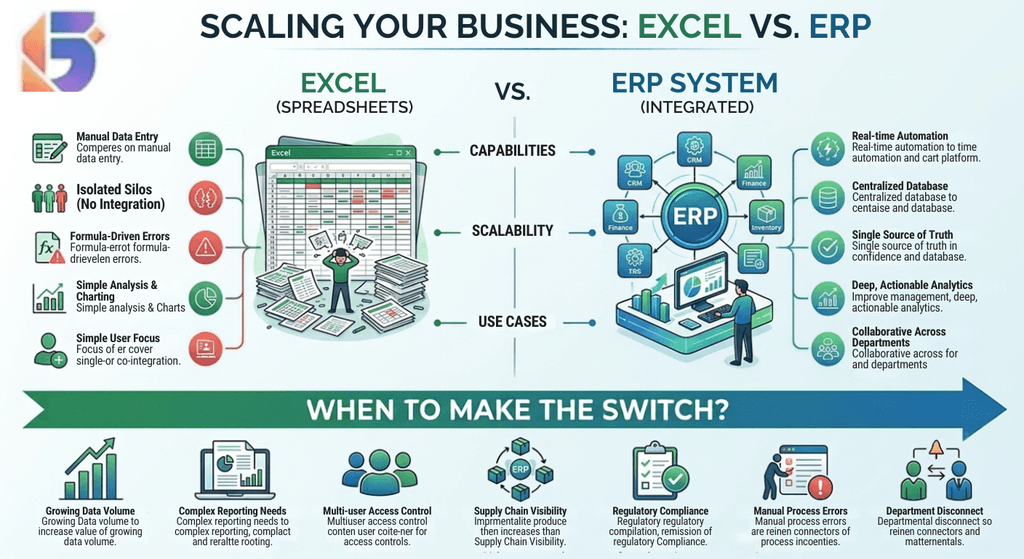
ERP vs Excel: When Should a Business Make the Switch?
For many businesses, Excel is where business management begins. It is flexible, familiar, inexpensive, and powerful enough to handle everything from simple sales records to budgets, inventory lists, employee information, and financial calculations.
But as a business grows, Excel can gradually become more than a spreadsheet tool. It can become an unofficial business management system.
One employee maintains the sales sheet. Another updates inventory. Finance maintains a separate workbook. HR has another file. Managers request reports from different departments, and someone eventually has to combine everything manually.
This is where the ERP vs Excel question becomes important.
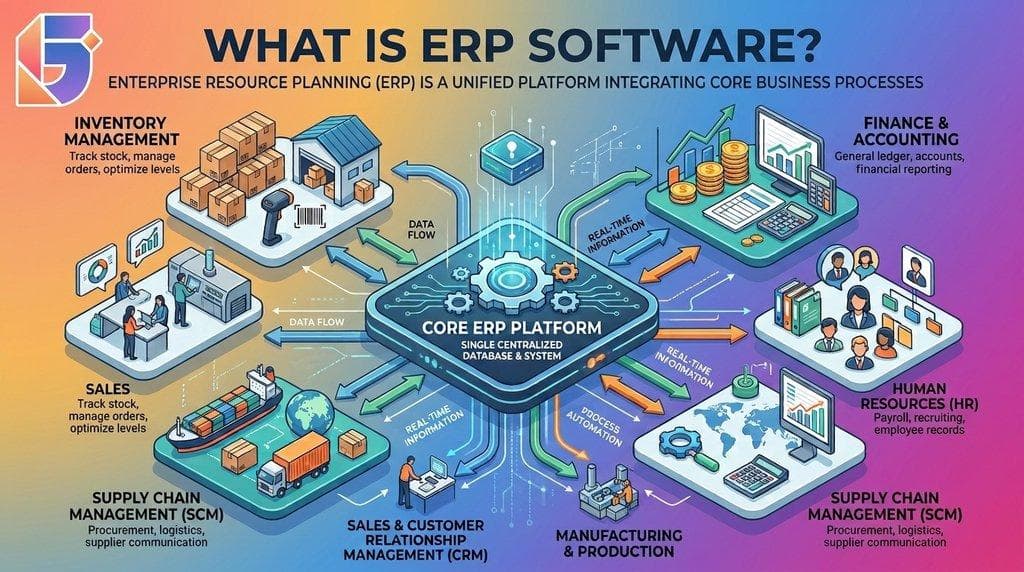
An ERP system can connect finance, inventory, procurement, sales, HR, manufacturing, and other business functions through an integrated platform. SAP describes ERP as software that connects core business processes and provides a unified view of business activity.
The question, however, is not whether ERP is better than Excel in every situation.
For a small business with simple operations, Excel may still be perfectly appropriate.
The better question is:
When does Excel stop being efficient enough for the way your business operates?
This guide explains the differences between ERP vs Excel, the warning signs that your business may have outgrown spreadsheets, the costs and risks involved, and what Nepalese businesses should consider before making the switch.
ERP vs Excel: What Is the Difference?
Before deciding whether to switch, it helps to understand what each tool is designed to do.
Microsoft Excel is primarily a spreadsheet and data-analysis application. It allows users to organize information, perform calculations, create charts, build formulas, and analyze data.
ERP software is designed to manage connected business processes.
An ERP system typically combines multiple business functions within an integrated environment. Depending on the platform, these can include accounting, inventory, purchasing, sales, human resources, manufacturing, supply chain, customer management, and reporting.
The fundamental difference is therefore integration.
Excel allows a business to manage information.
ERP allows a business to manage connected processes and information.
ERP vs Excel at a glance
| Business Requirement | Excel | ERP |
|---|---|---|
| Basic data entry | ✓ | ✓ |
| Calculations | ✓ | ✓ |
| Simple reports | ✓ | ✓ |
| Flexible ad-hoc analysis | ✓ | ✓ |
| Centralized business data | Limited | ✓ |
| Inventory workflows | Manual/configured | Integrated |
| Sales and accounting integration | Manual | ✓ |
| Procurement workflows | Manual | ✓ |
| Multi-department integration | Limited | ✓ |
| Role-based access | Basic/varies | ✓ |
| Automated workflows | Limited | ✓ |
| Multi-branch operations | Difficult at scale | ✓ |
| Real-time cross-department visibility | Limited | ✓ |
| Business-wide reporting | Manual consolidation | Integrated |
| Scalability | Depends heavily on workbook design | Designed for business processes |
This does not mean Excel is outdated or useless.
It means Excel and ERP solve different levels of business complexity.
Why Do Businesses Start With Excel?
There is a reason Excel remains popular.
For a new or small business, purchasing and implementing an ERP system may not be necessary.
A business might initially use Excel for:
- Sales tracking
- Expense records
- Inventory lists
- Employee records
- Customer databases
- Budgets
- Purchase records
- Simple financial calculations
- Monthly reports
Excel provides several advantages.
▸ Excel Is Familiar
Most office employees already understand basic spreadsheet concepts.
There is usually little training required to create a table, enter data, use formulas, or generate a chart.
▸ Excel Is Flexible
Businesses can create custom columns and calculations without waiting for software configuration.
If a manager wants a new column, an employee can often add one immediately.
▸ Excel Has a Low Initial Cost
Many organizations already have access to spreadsheet software, so there may be no separate ERP implementation cost.
▸ Excel Works Well for Small Data Sets
If a business has limited transactions and straightforward operations, a well-designed spreadsheet may be enough.
For example, a small service company with five employees and a relatively small number of monthly transactions may not need a complex ERP platform.
The problem begins when the spreadsheet becomes responsible for too many connected business processes.
When Does Excel Become a Problem?
Excel usually does not become a problem overnight.
Instead, businesses often experience a gradual increase in complexity.
A single spreadsheet becomes several.
Several become dozens.
Then employees start creating copies.
Soon, the business may have files such as:
Sales_2026.xlsxSales_Final.xlsxSales_Final_New.xlsxInventory_Updated.xlsxInventory_Final.xlsxAccounts_March.xlsxAccounts_March_Final.xlsx
The filenames themselves can become evidence that the business has a data-management problem.
At this stage, the issue is no longer whether Excel can technically perform the calculation.
The question becomes whether employees can consistently maintain accurate, current, accessible business information.
10 Signs Your Business May Have Outgrown Excel
There is no universal employee count or revenue threshold that automatically means a business needs ERP.
Instead, look at operational complexity.
Here are some of the most useful warning signs.
1. You Have Multiple Versions of the Same Data
If different departments maintain separate copies of customer, inventory, sales, or financial information, discrepancies can develop.
For example:
Sales says: 150 units sold.
Inventory says: 135 units remaining.
Finance says: 148 units invoiced.
Someone now has to determine which number is correct.
An ERP system can use integrated business data so that related transactions can flow between connected modules.
SAP describes modern ERP systems as using integrated modules that share a common database, allowing different business functions to work with connected information.
2. Employees Spend Too Much Time Preparing Reports
If management asks:
"How much did we sell last month?"
and someone needs half a day to collect information from several Excel files, that is an important warning sign.
Reporting should not depend entirely on manually combining spreadsheets.
ERP software can centralize transactional information and provide reporting based on connected business data.
This can make it easier to move from:
Collect → Clean → Combine → Calculate → Report
toward:
Access → Analyze → Decide
3. Inventory Is Becoming Difficult to Track
Inventory is one of the clearest areas where spreadsheet limitations can become visible.
Consider a business with:
- 2,000 products
- 3 warehouses
- 50 suppliers
- hundreds of monthly sales transactions
- frequent stock transfers
Maintaining all of this manually in Excel becomes increasingly complicated.
You may need to track:
- Opening stock
- Purchases
- Sales
- Returns
- Damaged products
- Transfers
- Adjustments
- Closing stock
- Reorder levels
An ERP inventory module can connect these activities with sales and purchasing workflows.
4. Departments Do Not Share Information Easily
A business might have separate spreadsheets for:
Sales
Inventory
Finance
Procurement
HR
The problem is that these departments are not actually independent.
A sale affects inventory.
A purchase affects inventory and accounts payable.
Payroll affects finance.
Customer orders affect sales and inventory.
Management needs information from all of them.
ERP software is designed around this type of process integration.
5. Manual Data Entry Is Increasing
Suppose an employee enters the same customer information into:
➜ Sales Excel file
➜ Invoice system
➜ Inventory sheet
➜ Accounting system
➜ Management report
That creates unnecessary duplication.
It also creates additional opportunities for inconsistencies.
A connected ERP system can allow information captured during one process to become available to other authorized processes.
6. Spreadsheet Errors Are Affecting Business Decisions
Spreadsheets are powerful, but they are also dependent on user-created formulas, references, data entry, and workbook structure.
A Forbes analysis citing research on spreadsheet errors reported that 88% of audited spreadsheets contained significant errors. The figure comes from studies of audited spreadsheets rather than all spreadsheets in existence, so it should not be interpreted as a universal error rate.
Common spreadsheet problems can include:
- Incorrect formulas
- Broken references
- Copy-and-paste errors
- Duplicate data
- Hidden cells
- Incorrect ranges
- Outdated versions
- Accidental overwriting
The issue becomes particularly important when spreadsheets are used for decisions involving finance, inventory, purchasing, or business performance.
7. You Are Managing Multiple Branches
A single-location business may be able to maintain relatively simple spreadsheets.
Multiple branches introduce another layer of complexity.
Management may need to compare:
- Branch sales
- Branch inventory
- Branch expenses
- Employee performance
- Purchasing
- Customer activity
- Profitability
If each branch maintains its own Excel files, management may need to consolidate information manually.
An ERP system can provide a centralized environment where branch operations can be managed according to the system's supported multi-location functionality.
8. Approval Processes Are Becoming Complicated
Consider a purchasing process:
Purchase Request → Manager Approval → Purchase Order → Goods Received → Invoice → Payment
An Excel spreadsheet can record these stages.
But recording a process is different from managing the workflow.
ERP software can provide workflow capabilities where supported, allowing organizations to define approvals, permissions, and process stages.
This can make business processes more structured and traceable.
9. Employees Depend on One "Excel Expert"
This is another important warning sign.
If only one employee understands:
- The formulas
- The macros
- The workbook structure
- The reporting logic
- The hidden sheets
- The data relationships
then the business has created a knowledge dependency.
What happens if that employee leaves?
The business may still possess the spreadsheet, but not necessarily the knowledge required to maintain it.
ERP systems can standardize processes and permissions within the software rather than keeping critical operational knowledge inside one person's workbook.
10. Management Wants Real-Time Business Visibility
Eventually, business owners and managers often want answers such as:
- What are today's sales?
- What is our current inventory?
- Which customers have outstanding balances?
- What have we purchased this month?
- Which branch is generating the most revenue?
- What are our current expenses?
- What products are moving slowly?
If answering these questions requires manually collecting information from several files, your business may be approaching the point where ERP becomes worth evaluating.
ERP vs Excel: Cost Comparison
One reason businesses delay ERP implementation is cost.
That is understandable.
ERP software can involve:
- Licensing or subscription fees
- Implementation
- Data migration
- Training
- Customization
- Integration
- Maintenance
- Support
Excel may appear significantly cheaper.
However, businesses should compare total cost, not just software price.
The hidden cost of spreadsheets
A spreadsheet-based system can require employees to spend time on:
- Data entry
- Data cleaning
- Report preparation
- File consolidation
- Error correction
- Reconciliation
- Duplicate entry
- Manual approvals
Those hours have a business cost.
For example, imagine five employees each spend two hours every week consolidating and checking spreadsheets.
That is:
5 employees × 2 hours × 52 weeks = 520 employee-hours per year
The actual cost depends on employee compensation and the value of their time.
This does not mean every business should immediately replace Excel with ERP.
It means businesses should calculate the operational cost of their current system before deciding.
ERP vs Excel for Inventory Management
Inventory is one area where the difference can become especially noticeable.
Excel inventory management
Excel can track:
- Product names
- SKU numbers
- Opening quantity
- Purchases
- Sales
- Closing quantity
But the process often relies on users entering and updating information correctly.
ERP inventory management
An ERP system can connect inventory with:
Purchasing + Sales + Warehouse + Accounting + Suppliers
For example:
Purchase Order → Goods Receipt → Inventory Update → Supplier Invoice → Accounts Payable
And:
Sales Order → Stock Deduction → Invoice → Accounting
This connected workflow is one of the central reasons businesses move from spreadsheets toward ERP.
ERP vs Excel for Accounting
Excel can be extremely useful for financial analysis.
However, using spreadsheets as the central system for all financial transactions becomes more challenging as transaction volumes and business complexity increase.
ERP finance modules can connect accounting with:
- Sales
- Purchasing
- Inventory
- Payroll
- Expenses
- Banking
- Reporting
This means financial information can be generated from operational transactions instead of repeatedly re-entering information.
For businesses operating in Nepal, accounting and tax-related processes also need to reflect applicable local requirements. The Inland Revenue Department provides official information concerning PAN, VAT, tax processes, and related requirements.
Businesses should therefore verify that their chosen ERP supports their specific compliance and reporting requirements rather than assuming that every ERP handles Nepal-specific requirements in the same way.
ERP vs Excel for Business Reporting
Excel remains excellent for analysis.
ERP becomes particularly valuable when businesses need connected reporting.
For example, a manager may want to understand:
"Which products generated the most revenue and how much stock remains?"
With separate spreadsheets, this may require combining sales and inventory data.
With an integrated ERP system, sales and inventory may already be connected.
This is the distinction between:
Spreadsheet-based analysis
and
Integrated business intelligence and reporting.
When Should a Small Business Switch From Excel to ERP?
There is no magic number.
A company does not automatically need ERP when it reaches 10, 20, 50, or 100 employees.
Instead, consider the following questions:
- Business Complexity
Do you have multiple departments?
- Transaction Volume
Are sales, purchases, invoices, or inventory transactions increasing rapidly?
- Data
Are employees maintaining multiple copies of the same information?
- Reporting
Does management regularly wait for reports?
- Inventory
Are stock discrepancies becoming common?
- Branches
Are you managing multiple locations?
- Processes
Are approvals and workflows becoming difficult to track?
- Growth
Do you expect your business to expand significantly?
If several answers are "yes," it may be time to evaluate ERP.
When Should You Keep Using Excel?
ERP is not automatically the right choice.
Excel may remain suitable when:
- Your business is small.
- You have relatively few transactions.
- Your operations are straightforward.
- You have one location.
- Your inventory is limited.
- You do not require complex workflows.
- Your reporting needs are simple.
- A small number of employees manage the data.
- Your current system is reliable and easy to maintain.
There is nothing wrong with using Excel when Excel genuinely meets the business requirement.
The goal should be appropriate technology, not technology for its own sake.
A Practical ERP Readiness Checklist
Use this checklist to determine whether your business should begin evaluating ERP software.
| Question | Yes/No |
|---|---|
| Do multiple departments maintain separate spreadsheets? | |
| Do employees enter the same data multiple times? | |
| Are spreadsheet errors affecting operations? | |
| Does management wait for reports? | |
| Is inventory difficult to track? | |
| Do you operate multiple branches or warehouses? | |
| Are purchase approvals difficult to manage? | |
| Are sales and accounting systems disconnected? | |
| Do employees spend significant time consolidating data? | |
| Are you experiencing rapid business growth? | |
| Do you need centralized reporting? | |
| Are you planning to add new departments or locations? |
If you answered yes to several questions, an ERP assessment may be worth considering.
This is not a mathematical rule. It is a practical way to identify operational complexity.
How to Move From Excel to ERP?
Switching from spreadsheets to ERP should be planned carefully.
Do not simply upload every Excel file into a new system.
Step 1: Document Existing Processes
Map how information currently moves through the organization.
For example:
Customer Order → Sales → Inventory → Invoice → Accounting
Document who performs each step.
Step 2: Identify Problems
Determine where the current system causes:
- Delays
- Duplicate entry
- Errors
- Missing information
- Manual reporting
- Approval bottlenecks
Step 3: Determine Required ERP Modules
Do not purchase modules simply because they exist.
Identify the modules your business actually needs.
For example:
Trading Business: Sales + Inventory + Accounting + Procurement
Manufacturing Business: Production + Inventory + Procurement + Accounting + Sales
Service Business: CRM + Project Management + HR + Accounting
Step 4: Clean Your Data
Before migration, review your existing spreadsheets.
Remove:
- Duplicate customers
- Duplicate products
- Old records
- Incorrect information
- Inconsistent naming
- Unused columns
Clean data makes ERP implementation significantly easier.
Step 5: Choose a Deployment Model
Businesses may consider:
- Cloud ERP
- On-premise ERP
- Hybrid ERP
Cloud ERP can provide internet-based access and centralized infrastructure, while on-premise deployments can provide greater control over infrastructure.
The appropriate model depends on business requirements, security considerations, budget, connectivity, IT capabilities, and operational needs.
Step 6: Train Employees
An ERP system only creates value when employees actually use it correctly.
Training should cover:
- Daily workflows
- Data entry
- Approvals
- Reporting
- Permissions
- Error handling
- Department-specific processes
Step 7: Implement Gradually Where Appropriate
Some organizations may benefit from a phased implementation.
For example:
Phase 1: Accounting + Inventory
Phase 2: Sales + Procurement
Phase 3: HR + Payroll
Phase 4: Manufacturing + Advanced Reporting
The appropriate rollout depends on business size, complexity, and ERP implementation strategy.
ERP vs Excel: Common Mistakes Businesses Make
Mistake 1: Waiting Until Excel Completely Breaks
Businesses sometimes wait until spreadsheets become unmanageable before evaluating ERP.
By that stage, data cleanup and migration may be more difficult.
Mistake 2: Choosing ERP Only Based on Price
The cheapest ERP may not necessarily be the most suitable.
Consider:
- Features
- Implementation
- Support
- Scalability
- Integration
- Security
- Customization
- Training
- Total cost of ownership
Mistake 3: Buying Too Many Features
A business does not need every ERP module.
Choose according to actual requirements.
Mistake 4: Ignoring Employee Adoption
ERP implementation is not only an IT project.
It changes how employees perform their daily work.
Employee training and process adoption are therefore important parts of implementation.
Mistake 5: Over-Customizing the System
Customization can help meet specific requirements, but excessive customization can increase costs and make future upgrades more complicated.
Businesses should first determine whether their requirements can be met through standard ERP functionality or configuration.
ERP vs Excel for Businesses in Nepal
The ERP decision can have additional considerations for businesses operating in Nepal.
Organizations may need to evaluate:
- PAN and VAT-related workflows
- Local accounting practices
- Tax reporting requirements
- Nepali business processes
- Bikram Sambat calendar requirements where applicable
- Local currency
- Branch operations
- Inventory management
- Local support
- Internet connectivity
- Cloud versus on-premise deployment
- Integration requirements
The Inland Revenue Department maintains official information and resources related to PAN, VAT, tax administration, and electronic invoicing-related software listings.
For this reason, a company evaluating ERP software in Nepal should assess both the technical capabilities of the ERP and its ability to fit the organization's local operational and regulatory environment.
Can Excel and ERP Be Used Together?
Yes.
Switching to ERP does not mean that Excel has to disappear from the organization.
In fact, Excel can remain useful for:
- Data analysis
- Forecasting
- Custom calculations
- Ad-hoc reports
- Financial modeling
- Charts
- Management presentations
The important distinction is that the ERP can serve as the primary operational system, while Excel can be used as an analytical tool.
For example:
ERP → Reliable operational data → Excel → Advanced analysis
This can be a more practical model than trying to force Excel to become the entire business management system.
ERP vs Excel: The Decision Framework
Instead of asking:
"Is ERP better than Excel?"
ask these five questions:
1. How complex are our operations?
The more departments, products, branches, employees, and workflows you have, the more important integration becomes.
2. How much manual work exists?
If employees spend significant time moving data between files, calculate the cost.
3. How reliable is our current information?
If management regularly questions which spreadsheet contains the correct information, centralized data may provide significant value.
4. How fast is the business growing?
A system that works today may not work efficiently after significant expansion.
5. What do we actually need?
ERP should be selected based on business requirements rather than simply following industry trends.
The Real Question Is Not ERP vs Excel
The debate around ERP vs Excel is sometimes framed as if businesses must choose one or the other.
In reality, they serve different purposes.
Excel is a flexible spreadsheet and analysis tool.
ERP is an integrated business management platform.
Excel can remain extremely useful even after a business adopts ERP.
The key question is whether Excel is being used for what it does best—or whether the business is asking spreadsheets to perform the work of an integrated ERP system.
When spreadsheets start creating duplicate data, reporting delays, inventory problems, manual reconciliation, and dependency on individual employees, the business should at least evaluate whether an ERP solution can address those challenges.
Frequently Asked Questions (FAQ's):
Q. Is ERP better than Excel?
ERP and Excel serve different purposes. Excel is highly useful for spreadsheets, calculations, analysis, and flexible reporting, while ERP is designed to integrate and manage business processes.
Q. When should a business switch from Excel to ERP?
A business should consider evaluating ERP when spreadsheets become difficult to manage because of growing transaction volumes, multiple departments, inventory complexity, manual reporting, duplicate data, or multi-branch operations.
Q. Can a small business use ERP software?
Yes. ERP systems are available for businesses of different sizes. However, a small business should choose a system that matches its actual operational requirements rather than purchasing unnecessary complexity.
Q. Is Excel good for inventory management?
Excel can work well for simple inventory requirements. As product volumes, warehouses, transactions, and stock movements increase, an integrated inventory system may become more practical.
Q. Does ERP replace Excel?
Not necessarily. Businesses can continue using Excel for analysis, forecasting, calculations, and custom reporting while using ERP as their primary operational system.
Q. Is ERP more expensive than Excel?
ERP typically involves additional software and implementation costs. However, businesses should also consider the employee time, reporting effort, data reconciliation, and error-management costs associated with maintaining complex spreadsheet systems.
Q. What are the biggest disadvantages of using Excel for business management?
Common challenges include duplicate data, manual data entry, version conflicts, formula errors, limited workflow automation, difficult multi-user management, and manual report consolidation.
Q. What are the main benefits of ERP software?
ERP can help businesses integrate departments, centralize data, automate workflows, improve reporting, standardize processes, and provide greater visibility across operations.
Q. Can ERP integrate with Excel?
Many ERP platforms provide ways to export, import, or integrate data with spreadsheets, although the specific capabilities vary by ERP system.
Q. Should every business move from Excel to ERP?
No. Businesses should evaluate their operational complexity and requirements. Excel may remain appropriate for organizations with simple processes and limited data.
Q. What should Nepalese businesses check before choosing ERP software?
Businesses should evaluate accounting, PAN/VAT-related requirements, localization, reporting, deployment options, connectivity, integrations, security, scalability, implementation, and local technical support.
Q. How much does ERP implementation cost?
ERP implementation costs vary based on software licensing, users, modules, customization, data migration, integrations, training, infrastructure, and support. Businesses should compare total cost of ownership rather than only software price.
Q. Can ERP help a growing business?
ERP can provide an integrated structure for managing growing operations. Its usefulness depends on implementation quality, business requirements, user adoption, and the capabilities of the selected platform.
Conclusion: When Should You Switch From Excel to ERP?
The answer to ERP vs Excel is not simply "ERP wins."
For many small businesses, Excel is practical, flexible, and sufficient.
But when the business starts operating across multiple departments, branches, warehouses, products, employees, and processes, spreadsheets can become increasingly difficult to maintain.
The strongest signals that it may be time to evaluate ERP are usually operational rather than numerical:
- Reports take too long to prepare.
- Employees repeatedly enter the same information.
- Different departments have conflicting data.
- Inventory is difficult to track.
- Managers cannot easily access current information.
- Spreadsheet errors are affecting decisions.
- Business processes require complex approvals.
- The company is expanding rapidly.
At that point, the goal should not be to abandon Excel completely.
The goal is to build a more reliable operational foundation.
An ERP system can connect finance, sales, inventory, procurement, HR, manufacturing, and reporting so that business information moves through connected workflows rather than isolated spreadsheets.
For businesses evaluating ERP software in Nepal, the next step is to document current processes, identify the biggest operational bottlenecks, determine required modules, and compare ERP providers based on functionality, localization, implementation, support, scalability, and total cost.
If Excel is still serving your business well, keep using it.
If your business is increasingly working around the limitations of Excel, it may be time to explore what an ERP solution can do.
Looking for an ERP Solution for Your Business?
Geofinity Pvt. Ltd. helps businesses in Nepal streamline operations with integrated ERP and business management solutions.
📍 Baluwatar 4, Kathmandu, Nepal
📧 [email protected]
📞 +977 9802372660
Contact Geofinity today to discuss your ERP requirements.