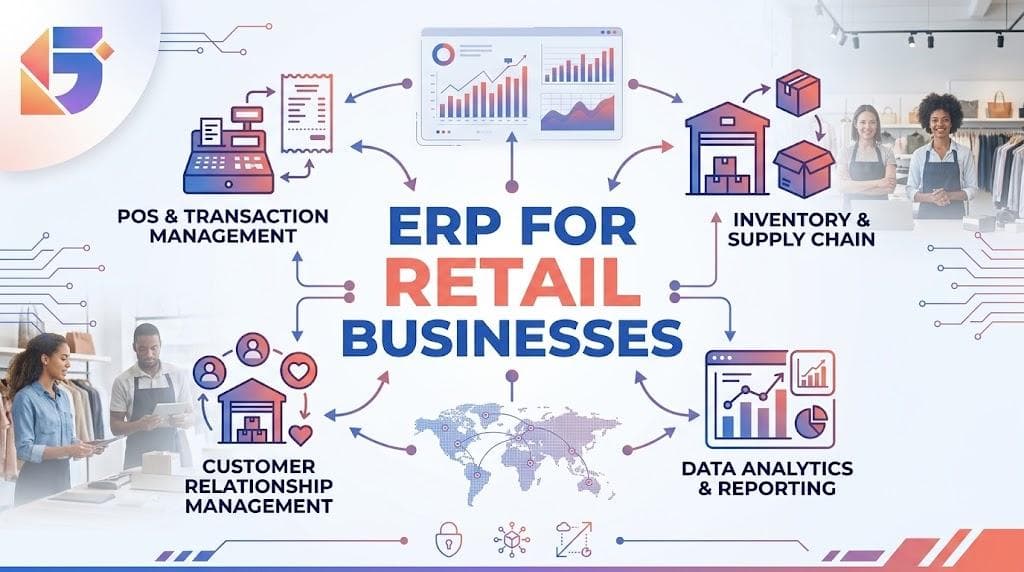
ERP for Retail Businesses: Managing Sales, Stock and Purchasing
Running a retail business involves much more than selling products. Every day, retailers need to track sales, monitor stock, manage suppliers, purchase the right products, control expenses, handle customers, and understand profitability.
As a retail business grows, managing these activities through notebooks, spreadsheets, separate billing systems, or disconnected software can become increasingly difficult. A sale recorded at the counter may not immediately update inventory. A purchase order may not be connected to supplier records. Management may have to wait until the end of the day or month to understand what actually happened.
This is where ERP for retail businesses becomes valuable.
A retail ERP system connects sales, inventory, purchasing, finance, customers, suppliers, and reporting within a centralized platform. Instead of maintaining separate records for different departments, businesses can use a shared system where transactions automatically update relevant business information.
For retailers in Nepal, this becomes particularly important as businesses expand across product categories, branches, suppliers, and digital payment channels.
According to Nepal's National Statistics Office (NSO), its 2022 Distributive Trade Survey covered 18,000 sample trade establishments and found that wholesale and retail trade, along with motor trade and repair, involved 1,130,645 people. Retail trade accounted for 88.65% of persons engaged across the covered trade categories.
That scale highlights why efficient systems for managing retail operations matter.
What Is ERP for Retail Businesses?
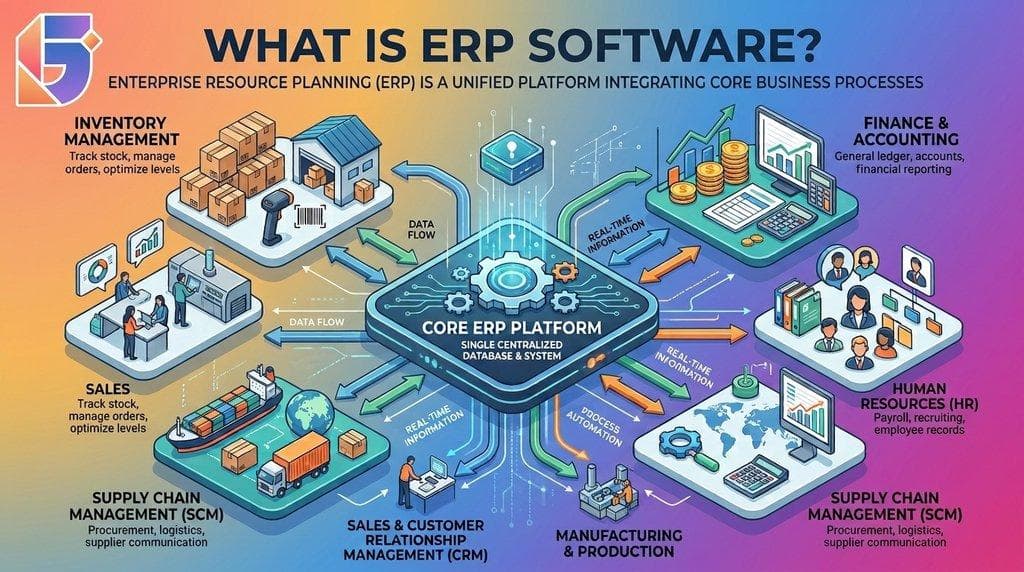
ERP for retail businesses is an enterprise resource planning system designed to bring the major operational activities of a retail company into one integrated platform.
Instead of using one system for billing, another spreadsheet for inventory, separate records for suppliers, and manual calculations for financial reporting, an ERP connects these functions.
A typical retail ERP can integrate:
- Sales and billing
- Inventory management
- Purchasing
- Supplier management
- Customer management
- Accounting and finance
- Branch management
- Product and price management
- Reporting and analytics
- Employee and user management
- Tax and invoice information
- Online and offline sales channels
The biggest advantage is connected information.
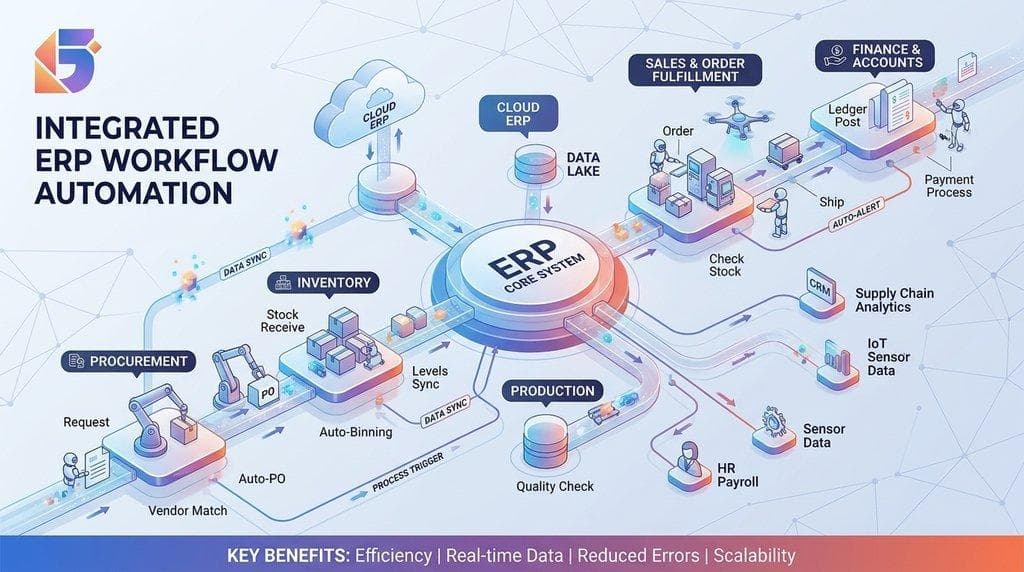
For example, when a customer purchases five units of a product, the ERP can record the sale, reduce available stock, update the sales report, record the financial transaction, and provide management with updated information.
This eliminates much of the duplicate data entry associated with disconnected systems.
Why Retail Businesses Need ERP Software?
Retail businesses deal with large numbers of relatively frequent transactions. Even a small store can have hundreds of products, multiple suppliers, changing prices, customer purchases, returns, discounts, and stock movements.
As operations become more complex, manual management creates several risks.
Common Retail Management Problems:
| Retail Challenge | Traditional Approach | ERP-Based Approach |
|---|---|---|
| Sales tracking | Manual records/spreadsheets | Centralized sales records |
| Stock tracking | Physical counting | Real-time inventory updates |
| Purchasing | Phone/messages/spreadsheets | Structured purchase workflow |
| Supplier management | Separate records | Central supplier database |
| Branch management | Independent records | Centralized branch visibility |
| Reporting | Manual calculations | Automated reports |
| Product pricing | Multiple files | Centralized price management |
| Reordering | Based on estimation | Stock-level alerts |
| Financial visibility | Delayed information | Connected financial data |
The objective is not simply to replace paper with software.
The real objective is to connect business processes so that information moves automatically between them.
How ERP Helps Manage Retail Sales?
Sales are at the center of every retail operation. However, recording a transaction is only one part of sales management.
A modern retail ERP can connect the sales transaction with inventory, customer information, payment records, and financial reporting.
1. Faster Billing
ERP systems can provide a centralized billing or point-of-sale interface where employees can quickly search products, apply prices or discounts, process sales, and generate invoices.
This can reduce manual calculations and make the checkout process more consistent.
For businesses handling a high volume of transactions, faster billing can improve both employee productivity and customer experience.
2. Automatic Stock Deduction
One of the most important connections is between sales and inventory.
When a product is sold, the system can automatically reduce the available quantity.
For example:
Opening stock: 100 units
Sales: 15 units
Available stock: 85 units
Instead of manually updating a spreadsheet after every transaction, the inventory record can be updated through the sales process.
3. Sales by Product
Retail managers can analyze which products are selling and which products are moving slowly.
Useful reports can include:
- Top-selling products
- Slow-moving products
- Sales by category
- Sales by employee
- Sales by branch
- Daily sales
- Monthly sales
- Sales by payment method
- Sales returns
- Discount reports
These insights help management make better decisions about pricing, promotions, and purchasing.
ERP for Retail Inventory Management
For many retailers, inventory management is one of the strongest reasons to adopt ERP software.
Too much stock can tie up working capital, while too little stock can result in missed sales.
A retail ERP provides a structured way to monitor inventory from purchasing through sales.
▸ Real-Time Stock Visibility
Instead of asking employees to manually check several records, management can access current inventory information from the system.
Depending on the ERP configuration, businesses can monitor:
- Current stock
- Available stock
- Reserved stock
- Damaged stock
- Returned products
- Stock transfers
- Stock adjustments
- Reorder levels
- Product batches
- Expiry dates
This is particularly useful for retailers dealing with large product catalogs or multiple locations.
▸ Avoiding Stockouts
A stockout occurs when customers want to purchase an item but the business does not have sufficient inventory.
ERP can help businesses establish minimum stock or reorder levels.
For example:
| Product | Current Stock | Reorder Level | Status |
|---|---|---|---|
| Product A | 85 | 30 | Healthy |
| Product B | 22 | 25 | Reorder |
| Product C | 8 | 20 | Urgent |
| Product D | 140 | 50 | Healthy |
Instead of discovering shortages after products have already sold out, managers can identify items that require purchasing.
Managing Purchasing Through ERP
Purchasing is closely connected to inventory.
When stock falls below an acceptable level, the business needs to determine what to buy, how much to buy, from whom, and at what price.
An ERP can organize this process.
▸ Typical Retail Purchasing Workflow
Stock requirement → Purchase request → Supplier selection → Purchase order → Goods received → Inventory updated → Supplier invoice → Payment
This creates a traceable purchasing process.
▸ Supplier Management
A retail ERP can maintain supplier information such as:
- Supplier name
- Contact information
- Products supplied
- Purchase prices
- Previous purchase history
- Payment terms
- Outstanding balances
- Delivery history
This information helps retailers evaluate suppliers based on more than just price.
For example, a supplier offering a lower price may not necessarily be the best option if deliveries are frequently delayed.
Connecting Purchasing and Inventory
One of the biggest advantages of ERP is that purchasing does not have to remain separate from inventory.
When purchased products are received, inventory records can be updated accordingly.
For example:
Current stock: 25 units
Purchased: 100 units
New stock: 125 units
When products are subsequently sold, the quantity decreases.
This creates a continuous flow:
Purchasing → Inventory → Sales → Financial Records
That connected workflow provides management with a much clearer picture of the business.
ERP for Multi-Branch Retail Businesses
Managing one retail location is different from managing five, ten, or twenty.
Multi-branch businesses need to understand:
- Which branch has which products?
- Which branch is selling the most?
- Where is inventory sitting idle?
- Which products need to be transferred?
- Which suppliers serve each branch?
- What is the profitability of each location?
A centralized ERP can provide branch-level and consolidated reporting.
For example:
| Metric | Kathmandu | Pokhara | Chitwan | Total |
|---|---|---|---|---|
| Sales | NPR X | NPR X | NPR X | NPR X |
| Purchases | NPR X | NPR X | NPR X | NPR X |
| Stock | X units | X units | X units | X units |
| Returns | X | X | X | X |
This allows management to move beyond individual branch records and understand overall business performance.
Managing Retail Purchasing More Efficiently
Purchasing decisions directly affect cash flow and profitability.
Buying too much can create excess inventory. Buying too little can create stockouts.
An ERP can help retailers analyze historical sales and current stock before placing new purchase orders.
Better Purchasing Decisions Can Consider:
- Current inventory
- Historical sales
- Seasonal demand
- Supplier lead time
- Purchase price
- Reorder levels
- Pending purchase orders
- Branch requirements
- Product performance
This helps transform purchasing from a guess-based activity into a data-supported process.
ERP and Retail Reporting
Retail businesses generate large amounts of data every day.
However, data becomes useful only when businesses can turn it into actionable information.
A retail ERP can provide dashboards and reports covering areas such as:
▸ Sales:
- Daily sales
- Monthly sales
- Product-wise sales
- Category-wise sales
- Branch-wise sales
▸ Inventory:
- Current stock
- Low-stock products
- Stock valuation
- Slow-moving products
- Fast-moving products
▸ Purchasing:
- Purchase history
- Supplier performance
- Purchase by product
- Outstanding purchase orders
▸ Finance:
- Revenue
- Expenses
- Receivables
- Payables
- Profitability
This gives business owners a more complete picture of operational performance.
ERP Can Support Better Retail Decision-Making
The biggest benefit of ERP is not simply automation.
It is better decision-making based on connected business information.
Imagine a retailer wants to know why profits declined this month.
With disconnected records, management may need to compare sales spreadsheets, purchase records, inventory reports, and accounting data manually.
With an integrated ERP, management can investigate:
Sales → Product margins → Purchasing costs → Inventory → Expenses → Profitability
This makes it easier to identify potential problems.
For example, sales may have increased while profitability decreased because purchase costs increased or discounts became excessive.
ERP and Digital Payments in Nepal
Retail payment behavior is also changing.
Nepal Rastra Bank reported that digital transactions grew significantly during FY 2024/25, supported by improvements in digital payment infrastructure and increased use of digital payment instruments.
For retailers, this makes payment tracking another important part of connected business management.
Depending on the implementation, retail ERP solutions can help businesses maintain transaction records across supported payment methods and reconcile sales information with financial records.
Nepal Rastra Bank's Payment Systems Department is responsible for policy, licensing, regulation, and oversight of payment service operators and providers in Nepal.
For businesses operating in Nepal, ERP selection should therefore consider local payment workflows, accounting requirements, tax processes, and integration capabilities.
ERP and Retail Compliance in Nepal
Retail businesses in Nepal also need to consider local financial and taxation requirements when selecting business software.
The Inland Revenue Department publishes information regarding electronic billing software and related procedures, making billing and compliance capabilities an important consideration when evaluating retail software.
Rather than selecting an ERP based only on its appearance or number of features, retailers should evaluate whether it can support their actual operational and compliance requirements.
Key Features to Look for in Retail ERP Software
Not every ERP system is equally suitable for retail.
When evaluating ERP software for retail, businesses should consider the following capabilities:
Essential Retail ERP Features:
- Point of Sale and Sales Management
- Real-Time Inventory Management
- Purchase Management
- Supplier Management
- Product and Category Management
- Multi-Branch Management
- Customer Management
- Accounting Integration
- Sales and Inventory Reporting
- Role-Based Access
- Dashboard and Analytics
- Tax and Billing Support
- Stock Transfer Management
- Returns and Adjustments
- Cloud or On-Premise Deployment Options
The right combination depends on the size and operational complexity of the retailer.
When Should a Retail Business Implement ERP?
A business does not necessarily need ERP on its first day.
However, several signs indicate that it may be time to consider one.
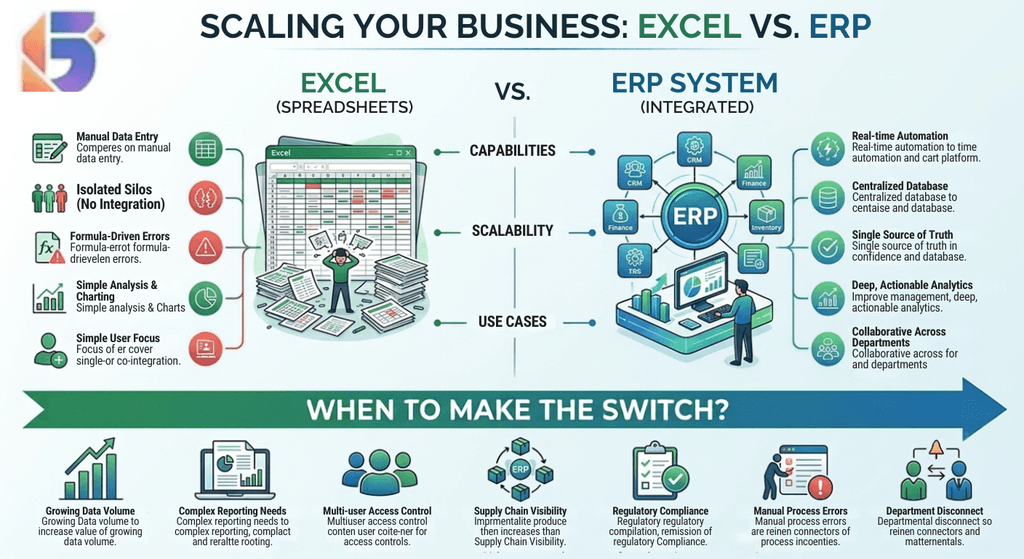
Consider ERP If:
- You are managing inventory through spreadsheets.
- Stock quantities frequently differ from physical stock.
- You have multiple branches.
- Employees enter the same information into multiple systems.
- You frequently run out of popular products.
- You have excessive slow-moving inventory.
- Purchasing decisions are mostly based on guesswork.
- Management cannot quickly access sales reports.
- Supplier information is scattered.
- Financial and operational information are disconnected.
- Business owners spend too much time preparing reports manually.
If these problems are becoming routine, an ERP may provide a more scalable operational foundation.
ERP vs Separate Retail Software
A retailer can use individual applications for billing, inventory, accounting, and purchasing.
However, the challenge is integration.
| Area | Separate Systems | Integrated ERP |
|---|---|---|
| Sales | Separate | Connected |
| Inventory | Separate updates | Sales-linked |
| Purchasing | Separate | Inventory-linked |
| Accounting | Often manual transfer | Integrated workflow |
| Reporting | Requires consolidation | Centralized |
| Branch visibility | Difficult | Centralized |
| Data duplication | Higher | Lower |
| Decision-making | Slower | Faster |
An integrated ERP does not automatically solve every business problem, but it can create a single operational source of information.
How to Implement ERP in a Retail Business?
ERP implementation should be treated as a business transformation project rather than simply installing software.
Step 1: Identify Current Problems
Document how sales, purchasing, inventory, accounting, and reporting currently work.
Step 2: Define Requirements
Determine which processes need automation and which reports management needs.
Step 3: Clean Existing Data
Product names, SKUs, supplier records, opening stock, customer information, and financial data should be reviewed before migration.
Step 4: Configure the ERP
Set up products, branches, warehouses, users, permissions, tax settings, pricing, suppliers, and workflows.
Step 5: Train Employees
Employees should understand not only how to use the system, but why accurate data entry matters.
Step 6: Test the Workflow
Test realistic scenarios:
Purchase → Receive Stock → Sell → Return → Adjust Stock → Generate Report
Step 7: Launch and Monitor
After deployment, monitor errors, user adoption, reports, and process improvements.
Common ERP Mistakes Retailers Should Avoid:
ERP can deliver significant benefits, but poor implementation can reduce its value.
1. Choosing Software Based Only on Price
The cheapest system may not provide the functionality or scalability the business needs.
2. Ignoring User Experience
If employees find the software unnecessarily difficult, adoption may suffer.
3. Migrating Unclean Data
Incorrect product names, duplicate SKUs, and inaccurate opening stock can create problems from day one.
4. Automating a Bad Process
ERP should improve workflows rather than simply digitize inefficient ones.
5. Not Planning for Growth
A retailer should consider future branches, products, users, warehouses, and sales channels before selecting a system.
6. Ignoring Reporting Requirements
Management should define the reports required before ERP implementation.
Why ERP Is Becoming Important for Nepalese Retail Businesses?
Nepal's retail environment includes businesses ranging from small independent stores to supermarkets, distributors, specialty retailers, pharmacies, electronics businesses, fashion stores, and multi-location chains.
The National Statistics Office's 2022 Distributive Trade Survey found that 31.8% of covered wholesale and retail trade establishments and motor trade/repair establishments remained unregistered, while 68.2% were registered with government agencies.
As businesses formalize, expand, and adopt digital processes, structured systems become increasingly valuable.
At the same time, increasing digital-payment adoption is creating more digitally recorded transactions, making connected sales, inventory, and financial information increasingly useful for retailers.
For Nepalese businesses, the goal should not simply be to adopt technology because it is modern.
The goal should be to use technology to reduce operational friction, improve visibility, control inventory, and support sustainable growth.
How Geofinity Can Help Retail Businesses?
Choosing and implementing an ERP requires more than purchasing software.
Businesses need to understand their workflows, identify the right modules, migrate data correctly, configure the system, train employees, and establish processes for long-term use.
Geofinity Solutions helps businesses explore technology solutions that align with their operational requirements, including ERP, business software, web technologies, and digital transformation.
For a retail business, the right ERP solution can bring sales, inventory, purchasing, suppliers, finance, and reporting into a connected environment.
Whether you are managing a single store or planning to expand across multiple branches, evaluating your current processes is a practical first step toward determining whether ERP is right for your business.
Need help evaluating an ERP solution for your retail business? Contact Geofinity Solutions to discuss your business requirements and explore a solution built around your operational needs.
Frequently Asked Questions (FAQ's):
Q. What is ERP for retail businesses?
ERP for retail businesses is an integrated software system that connects sales, inventory, purchasing, suppliers, finance, reporting, and other retail operations.
Q. How does ERP improve retail inventory management?
ERP can connect sales and purchasing with inventory records, helping businesses monitor stock levels, identify low-stock products, track stock movements, and reduce manual inventory work.
Q. Can ERP manage retail sales and billing?
Yes. Retail ERP systems can include sales and billing functionality, allowing businesses to record transactions and connect sales information with inventory and reporting.
Q. Can ERP manage multiple retail branches?
Yes. Many ERP systems support multiple branches, warehouses, users, and locations, allowing businesses to monitor branch-level and consolidated performance.
Q. How does ERP help with retail purchasing?
ERP can organize purchase requests, purchase orders, supplier records, goods receipts, purchasing history, and related inventory updates.
Q. Can retail ERP track suppliers?
Yes. Supplier management features can store supplier information, purchase history, prices, payment terms, and outstanding transactions.
Q. Is ERP useful for small retail businesses?
ERP can be useful for small retailers when operational complexity begins increasing. Businesses should select a system that matches their current needs while allowing reasonable future growth.
Q. Does ERP reduce stockouts?
ERP can help reduce stockouts by providing inventory visibility and supporting reorder levels and purchasing workflows. However, results depend on accurate data and appropriate inventory policies.
Q. Can ERP integrate accounting with retail sales?
Many ERP platforms can connect sales, purchasing, inventory, and accounting processes, reducing the need for repetitive manual data entry.
Q. How long does retail ERP implementation take?
Implementation time varies based on business size, number of branches, data volume, integrations, customization, and employee training requirements.
Q. What should retailers consider when choosing ERP software?
Retailers should evaluate inventory, sales, purchasing, accounting, reporting, branch management, integrations, security, scalability, usability, local requirements, and implementation support.
Q. Is ERP better than Excel for retail inventory?
For growing businesses with complex inventory and frequent transactions, an integrated ERP can provide stronger automation, visibility, controls, and reporting than manually maintained spreadsheets.
Conclusion: Build a More Connected Retail Business With ERP
Retail success depends on having the right products available at the right time, selling them efficiently, purchasing intelligently, and understanding what is happening across the business.
ERP for retail businesses brings these activities together.
Instead of treating sales, stock, purchasing, suppliers, and financial information as separate activities, an integrated ERP creates a connected flow of information.
For growing retailers, this can mean better inventory visibility, more organized purchasing, faster reporting, improved operational control, and more informed decision-making.
The right ERP is not simply another software expense. When properly selected and implemented, it can become part of the infrastructure that helps a retail business operate more efficiently and scale with greater confidence.
Ready to explore ERP for your retail business? Talk to Geofinity Solutions about your business requirements and discover how an integrated technology solution can support your next stage of growth.
Geofinity Pvt. Ltd. helps businesses in Nepal with technology, software, ERP, digital solutions, and business-focused IT services.
📍 Baluwatar 4, Kathmandu, Nepal
📧 [email protected]
📞 +977 9802372660
Contact Geofinity to discuss your business technology requirements.